Start with the system, not the SDK
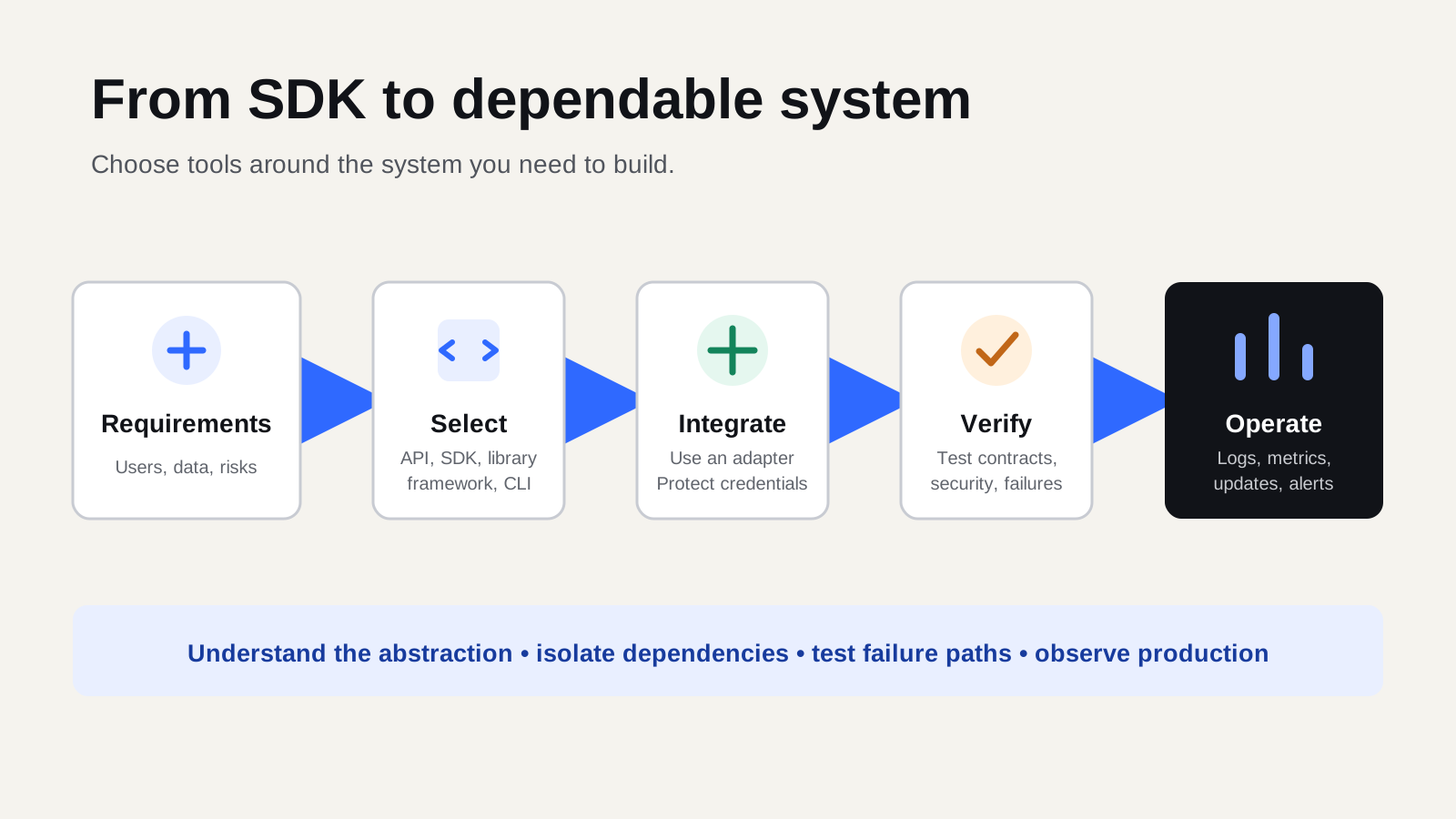
Developers can choose from thousands of SDKs, APIs, frameworks, libraries, and command-line tools. The challenge is not finding another tool. It is choosing a small, dependable set that fits the system being built.
Before installing anything, define:
- Who will use the system?
- What problem will it solve?
- What data will it process?
- Which security and reliability requirements matter?
- Which capabilities should be built internally or obtained from external services?
For example, a payment application may need identity, transaction processing, notifications, reporting, audit logs, and fraud controls. Choosing a payment SDK before defining these boundaries can make the design depend too heavily on one vendor.
Know what each tool provides
These terms are related, but they are not interchangeable.
- API: A contract that allows software components to communicate.
- SDK: A toolkit that makes it easier to build against a platform or API. It may include client libraries, types, documentation, examples, and testing utilities.
- Library: Reusable code for a focused task such as validation, database access, or cryptography.
- Framework: A structured foundation that influences how an application is organized and executed.
- CLI: A command-line tool that automates tasks such as project setup, testing, migrations, or deployment.
An SDK may hide repetitive networking work, but developers should still understand the API beneath it. You need to know how authentication, errors, rate limits, pagination, and retries behave.
Evaluate before adopting
A convenient installation command is not enough reason to add a dependency to a production system.
Confirm the fit
Make sure the tool supports the required operations, programming language, runtime, and deployment environment. Popularity does not guarantee suitability.
Check maintenance and security
Prefer official or actively maintained packages. Review recent releases, documentation, issue activity, licensing, and known vulnerabilities.
Check how the tool handles credentials, logs, network connections, and sensitive data. Lock dependency versions and verify package names and publishers to reduce software supply-chain risk.
Understand failure behavior
External services can be slow or unavailable. Find out how the SDK handles timeouts, retries, rate limits, and partial responses.
Automatic retries require care. Retrying a payment request without an idempotency key, for example, could create a duplicate transaction.
Consider long-term cost
Think about bundle size, performance, vendor lock-in, pricing, and how difficult the integration will be to replace. Sometimes an official SDK prevents mistakes. Sometimes a simple API client is easier to understand and maintain.
Test it in a small proof of concept
Before spreading an SDK across the application, test it in an isolated project.
Confirm that you can:
- Authenticate correctly
- Perform the main operations
- Understand error responses
- Mock the integration during tests
- Use it in the expected deployment environment
- Capture useful logs and metrics
A proof of concept reveals constraints early, before they become architecture problems.
Keep external tools behind an adapter
Avoid placing SDK calls throughout controllers, interface components, and business logic. Create a small service or adapter around each external provider.
For a notification system, your application could call:
sendMessage(recipient, template, data)
The adapter translates that operation into the provider’s SDK call. This makes the application easier to test, keeps authentication and error handling in one place, and reduces the work required to change providers later.
Use tools across the lifecycle
A useful developer toolchain supports the complete system, not only coding.
- Design: Architecture diagrams, OpenAPI contracts, threat models, and decision records.
- Development: Editors, type checking, linting, debugging, API clients, containers, and local emulators.
- Testing: Unit, integration, contract, end-to-end, dependency, secret, and security checks.
- Delivery: Version control, CI/CD, infrastructure as code, and secret management.
- Operation: Structured logs, metrics, traces, health checks, and alerts.
Mocks make local testing easier, but they can differ from the real service. Include tests against a sandbox or representative environment when possible.
A practical selection checklist
Before adding a tool, ask:
- Fit: Does it solve a documented requirement?
- Ownership: Is it actively maintained?
- Compatibility: Does it support our stack and deployment target?
- Security: What permissions and dependencies does it introduce?
- Reliability: How does it handle failures and retries?
- Testability: Can we test it without depending on production?
- Observability: Can we understand its behavior safely?
- Portability: Can we isolate or replace it later?
- Cost: What will it cost to adopt, operate, and migrate?
Final thought
Good developers do not measure progress by the number of tools installed. They use tools to reduce uncertainty, automate repeatable work, and make systems easier to understand.
Start with requirements. Choose the smallest toolset that fits. Understand the APIs beneath the abstractions, isolate external dependencies, and test failure paths. That is how SDKs become engineering leverage instead of long-term complexity.